SSIS 2012 Copy or Duplicate Environments

In SSIS 2012 there is a great new feature called environments. They can be thought of as a collection of parameters or variables. One of the questions I get asked when teaching SSIS 2012 is “Can I duplicate an environment?”. There is a move feature already included. But this moves the environment instead of copying.
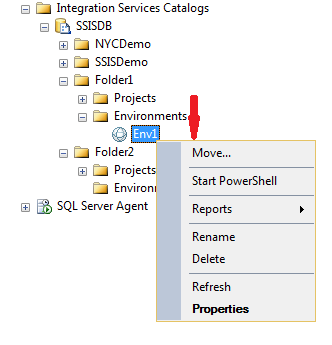
image

Now you can write T-SQL Scripts like the one at the bottom of this blog to create an environment and create the variables in the environment, but this is time consuming. You can script this out when you first create the environment and the variables. But if you have an already existing environment then this is not possible.

So how do you copy an environments? Here is a little trick to use.

First, to create the new Environment, right click on the new folder and select create environment. This is the easy part. The hard part is getting all of the variables inserted. You may have 50 variables in the previous environment to copy over. We need an easy way to copy them all over to the new environment.

Next, right click on the new environment and select properties. Take note of the environment identifier. Do the same for the previous environment.

image

Next, go to the SSISDB and take a look at the internal.environment_references table and find the Environment ID’s. The Environment identifier comes from internal.environment_references table. Then go to the [SSISDB].[internal].[environment_variables] table. This table contains all of the variables in your environments. You will find the rows for the previous environment for each variable in that environment. Look for the previous environment id you just noted.

image

Now we need to write a T-SQL statement to duplicate these rows with the new environment ID. This is a simple Insert into statement followed by a select statement. You will need to add in the Select statement a hard coded value of the new environment ID in the columns and a where clause looking for the previous environment id.

INSERT INTO [internal].[environment_variables]
([environment_id]
,[name]
,[description]
,[type]
,[sensitive]
,[value]
,[sensitive_value]
,[base_data_type])
SELECT  10 as environment_id  –New Environment ID
,[name]
,[description]
,[type]
,[sensitive]
,[value]
,[sensitive_value]
,[base_data_type]
FROM [SSISDB].[internal].[environment_variables]
where environment_id = 9  –Previous Environment ID

Make sure you create the new environment first and get the id’s correct in this script and you should be all set.

Also…

Here is the T-SQL code that can be scripted out when you first create an environment and the variables in it. But this can only be done when you first create them. The above solution works on any existing environments.

EXEC [SSISDB].[catalog].[create_environment] @environment_name=N’Test’, @environment_description=N”, @folder_name=N’SSISDemo’

GO

DECLARE @var sql_variant = N’test’
EXEC [SSISDB].[catalog].[create_environment_variable] @variable_name=N’test’, @sensitive=False, @description=N”, @environment_name=N’Test’, @folder_name=N’SSISDemo’, @value=@var, @data_type=N’String’
GO

DECLARE @var sql_variant = N’test1′
EXEC [SSISDB].[catalog].[create_environment_variable] @variable_name=N’test1′, @sensitive=False, @description=N”, @environment_name=N’Test’, @folder_name=N’SSISDemo’, @value=@var, @data_type=N’String’
GO

DECLARE @var sql_variant = N’test3′
EXEC [SSISDB].[catalog].[create_environment_variable] @variable_name=N’test3′, @sensitive=False, @description=N”, @environment_name=N’Test’, @folder_name=N’SSISDemo’, @value=@var, @data_type=N’String’
GO

Posted in SSIS, Syndication | Tagged , | 10 Comments

The IRS and SSRS

image

Recently I did a webinar on the IRS and SSRS. In this webinar I covered creating reports with images and forms. I also covered how to manipulate data and showed you how to cheat on your taxes(not really).You can download the files for this webinar here: http://www.bidn.com/Assets/Uploaded-CMS-Files/IRSandSSRS-cefd99fa-6074-4be6-84ee-db1490dd3f42.zip

You can watch the webinar here:http://pragmaticworks.com/Resources/webinars/Default.aspx

Posted in SSRS | Leave a comment

How to use Report Builder 3.0

I did a webinar during the 12 days of 2012 on how to use Report Builder 3.0. In this webinar I showed how to pull data from Stored Procedures and Shared Data sets. I also showed the issues that come with some of these items.You can see the webinar here: http://swrt.worktankseattle.com/series/59/seriessignup.aspx

Posted in SSRS, Syndication | Tagged | Leave a comment

Execute Multiple 2008/2005 SSIS Packages with a T-SQL

If you want to execute a set of SSIS packages in SQL Server 2008 or 2005, you can do this using T-SQL. First you will  need a table with all of your package names on it. Then a While loop to execute each package.

Here is the example code:

Declare @FilePath varchar(2000)

Declare @cmd varchar(2000)

DECLARE @package_name varchar(200)

Declare @PackageCount int

Declare @X int

Set @X = 1

Set @PackageCount = (Select COUNT(*) from Packages)

set @FilePath = ‘C:\Package Path\’

While (@X <= @PackageCount)
Begin

With PackageList as
(
Select PackageName, Row_Number() Over(Order by PackageName) as  Rownum
From Packages
)
SELECT @package_name = PackageName
FROM PackageList
Where Rownum = @X

select @cmd = ‘DTExec /F “‘ + @FilePath + @Package_name + ‘”‘

print @cmd

Set @X = @X + 1

exec master..xp_cmdshell @cmd

End

In the new version of SSIS 2012 you will be able to launch packages with T-SQL Natively.

Posted in SSIS, Syndication, T-SQL | Tagged | 6 Comments

Sorting a String as a Number with T-SQL and SSIS

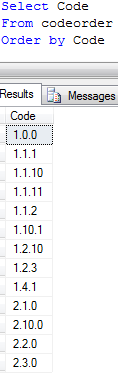
I was working on a Cube in Analysis Services for a client recently and needed to sort on a field that was a varchar but contained numeric data. I wanted to sort as if it was numeric. I could not just convert this code to a number and sort on that, because the codes had multiple decimals as seen in this image below.

image

Notice the numbers are sorted as a string and not numeric. You want the number 1.1.2 to come before 1.1.10. Instead you can see it is lower in the order due to the string order. You will also notice 2.2.0 should be before 2.10.0. This is happening because a string is evaluated as alphabetical when sorted. So the number 10 would come before the number 2. This is because 1 is less than 2. The zero in ten is not even checked because is it alphabetizing when ordering these fields.

To fix this issue you need get the individual numbers between the decimals in the code as integers and sort on each one. To get the first number we simply use a char index to get up to the first decimal with this SQL code. This code it getting the location (CharIndex) of the decimal and then getting the substring up the character before the decimal. Then is it converting it to an Integer.

convert(int,SUBSTRING(code,1, CHARINDEX(‘.’, code) – 1)) as Num1,

Then we need to get the number after the first decimal but stop at the second decimal. This is a little harder as you can tell by the below code. First we get the location of the first decimal plus one to use as the starting point in our substring. The length of the substring takes a little math. It is the length of the code minus the first decimal location minus the index of the last decimal.

convert(int,SUBSTRING(code, CHARINDEX(‘.’, code) + 1, LEN(Code) – CHARINDEX(‘.’, code) – Charindex(‘.’,REVERSE(code)))) as Num2,

Then we need to get the number after the last decimal. The location of the start of the substring is calculated by subtracting the length of the code minus the location of the last decimal place plus 2. The length of the code is used as the length of the substring, this is too long but since it is the last digit it works fine.

Convert(int,SUBSTRING(code, len(code) – Charindex(‘.’,REVERSE(code)) + 2, len(code))) as Num3

The complete Query will be:

Select Code,

convert(int,SUBSTRING(code,1, CHARINDEX(‘.’, code) – 1)) as Num1,

convert(int,SUBSTRING(code, CHARINDEX(‘.’, code) + 1, LEN(Code) – CHARINDEX(‘.’, code) – Charindex(‘.’,REVERSE(code)))) as Num2,

Convert(int,SUBSTRING(code, len(code) – Charindex(‘.’,REVERSE(code)) + 2, len(code))) as Num3

from CodeOrder

Order by Num1, Num2, num3

And the results of this query are:

image

You can see that the codes are in the numerical order we wanted. Your SQL code may need to be adjusted for the number of decimals in your field.

You can add these new columns to your dimension and use them as the key to your attributes and order by the key. You can change the dimension table in the DSV to a Named Query and add these new number fields.

If you prefer, you can go back to the SSIS package loading this dimension and create these new number columns on the dimension table. In SSIS the derived column transform could be used to do the same conversion that I am doing in the Named Query to get the numeric fields.

Which is better, SSIS or SQL? Should you do this in derived columns in your package or should you use SQL statements like the one above to perform this work?

Maintainability and Performance are the two items to consider when making this decision. The SQL Query will perform much better than the derived columns but the query could confuse others that may need to maintain this after you. The SSIS derived column tends to be a little easier to understand and managing one derived column in an SSIS package could be considered easier. This is debatable and I know hard core T-SQL Gurus are going to disagree.

Here is the derived column that does the same thing as the SQL statement above.

image

(DT_I4)SUBSTRING(Code,1,FINDSTRING(Code,”.”,1) – 1)

(DT_I4)SUBSTRING(Code,FINDSTRING(Code,”.”,1) + 1,FINDSTRING(Code,”.”,2) – FINDSTRING(Code,”.”,1) – 1)

(DT_I4)SUBSTRING(Code,FINDSTRING(Code,”.”,2) + 1,LEN(Code))

The FINDSTRING function allows you to select the occurrence you want to find so there is no need for the reverse and the extra subtraction that was needed in the SQL query.

The results are the same and these columns can now be added to the dimension table and be used to sort. The SQL statement did perform 20% faster than the derived column. But the Derived column could be considered easier to maintain depending on your level of T-SQL and your level of SSIS.

Also, as pointed out in the comments, you can use ParseName too.

SELECT code, 
Cast(PARSENAME(code, 3)as int) as Num1, 
cast(PARSENAME(code, 2) as int) as Num2, 
cast(PARSENAME(code, 1) as int) as Num3 
FROM CodeOrder
Order by Num1, Num2, num3
Posted in SSIS, Syndication, T-SQL | Tagged , | 2 Comments

Monitoring SQL Server with SSIS

SQL Server can be monitoring with SSIS packages using the DMVs in SQL Server. I did a webinar on this and you can watch the video at PragmaticWorks.com under the webinars page.

You can download the code for this webinar here.

I have updated the script. I removed the BIxPress compoents and included the date script. I have tested and it runs great.

Posted in SSIS | Tagged , | 28 Comments

Pragmatic Works Win Software Awards

Our Product BI xPress won two awards from SQL Server Magazine. Check it out!

http://www.sqlmag.com/content1/topic/2011-sql-server-magazine-editors-community-choice-awards-140830/catpath/awards/showprivate/1/page/3

Posted in Pragmatic Works | Tagged | Leave a comment

Dimensional Modeling

I did a webinar on dimensional modeling today at PragmaticWorks.com. You can watch the webinar there once they have the video uploaded. You can also download the slides from the video here.

In this webinar I covered the ten rules of Dimensional modeling from the Kimball group. Here are those rules:

1: Load detailed atomic data into dimensional structures

2: Structure dimensional models around business processes

3: Ensure that every fact table has an associated date dimension table

4: Ensure that all facts in a single fact table are at the same grain or level of detail

5: Resolve many-to-many relationships in fact tables

6: Resolve many-to-one relationships in dimension tables

7: Store report labels and filter domain values in dimension tables.

8: Make certain that dimension tables use a surrogate key

9: Create conformed dimensions to integrate data across the enterprise.

10: Continuously balance requirements and realities to deliver a DW/BI solution that’s accepted by business users and that supports their decision-making.

You can find more details here.

Posted in Dim Model | Tagged , , | Leave a comment

How to hide Calculated Members in MDX SSAS

With some calculated members in MDX it only makes sense to see the calculation if a certain Hierarchy is used.

For example:

Aggregate(YTD([Date].[Calendar].CurrentMember),[Internet Sales Amount])

This calculation only works in the Date.Calendar Hierarchy. I wanted to show the end users a message informing them about this and hide the calculation at the same time.

Here is how I did this:

Case when ([Date].[Calendar].level is [Date].[Calendar].[Calendar Year] or
[Date].[Calendar].level is [Date].[Calendar].[Calendar Semester] or
[Date].[Calendar].level is [Date].[Calendar].[Calendar Quarter] or
[Date].[Calendar].level is [Date].[Calendar].[Month]) then
aggregate(ytd([Date].[Calendar].currentmember),[Internet Sales Amount])
else “Use Date Hierarchy”
End

image

Now the user will see the message “Use Date Hierarchy”  if they are not at a level in the correct Hierarchy. The only downside to this is the grand total shows the message instead of the total.

image

If you can figure out a way to show the grand total when the user is in the correct hierarchy, let me know.

Posted in mdx, SSAS, Syndication | Tagged , | 4 Comments

Setting up SSIS Auditing Part 2

Auditing in SSIS can be a real headache. In this two part series blog I am going to try to make it a little easier. You can also download my white paper and sample files on Auditing SSIS here. You can also see this post and more at SQL University. Part 1 of the blog is here.

SQLUniversity

Creating a Custom Auditing Framework

Creating an auditing solution is time consuming but once built gives you the detailed information you want in your table and allows you to filter unnecessary data. You will create this custom auditing by adding tasks to the Event Handlers of the package.

Event Handlers

There are several event handlers listed under the event handler tab. Click on the event handlers tab at the top of the example package and you will see two drop down menus at the top. On the left there is a drop down with the tasks in the package and the package itself as seen in figure 8. You can create specific auditing for each task if desired. In this example you will create auditing for the entire package, so ensure the package name is selected.

clip_image001

Figure 8

The right drop down menu contains the events available for the package. Select the onError event handler and click the blue link in the center to create the onError event handler. Before you can start auditing you will need to create a table to write the data too. For this example you will be auditing the package name, task name, error description, and the date. Open SSMS and run the following SQL in your auditing database to create the auditing table.

CREATE TABLE [SSISErrorLog](

[RunTime] [datetime] NULL,

[Package] [varchar](500) NULL,

[Task] [varchar](500) NULL,

[Error] [varchar](500) NULL

) ON [PRIMARY]

Execute SQL Task

Now you are ready to insert data into this table. Before we insert data we need to create one more variable. There is a problem with the date format in SSIS. The DateTime format in SQL is different than the System variables in SSIS. The format in SQL is 1900-01-01 00:00:00.000, and the format in SSIS is 1/1/1900 12:00:00 AM. So you will need to convert the SSIS date to the SQL format. To do this, create a variable on the package named strStartTime and set the type to string. Set the variable to evaluate as an expression in the properties of the variable. Click on the expression ellipsis and enter the following code:

(DT_WSTR, 10)(DT_DBDATE)@[System::ContainerStartTime] + ” ” + (DT_WSTR, 8) (DT_DBTIME)@[System::ContainerStartTime]

This is the SSIS Script language. It will convert the start time of the current container to a format SQL will recognize.

Go back to the package onError Event Handler. Drag in an Execute SQL Task. Open this task and set the connection to the testing database. Enter the following SQL into the Execute SQL Task. Notice the convert function used to convert the string value of the date to a datetime for SQL.

INSERT INTO SSISErrorLog

([RunTime]

,[Package]

,[Task]

,[Error])

VALUES(CONVERT(datetime,(?)),?,?,?)

Click on the Parameters tab of the Execute SQL Task and enter the parameters as shown in figure 9 below. Notice the first parameter is the variable you create previously, the rest are system variables. Click ok to close the task and return to the control flow of the package.

clip_image003

Figure 9

You will need to cause an error in the package to have the Event Handler fire. Open the first Execute SQL Task in the For Each Loop and put the letter ‘X’ in front of the SQL command. This will cause a syntax error. Run the package. The package should fail. Open SSMS and query the SSISErrorLog table and you should see the data from the package run as seen in figure 10 below.

clip_image005

Figure 10

If you do not see any data, return to the package and look under the Progress/Execution Results tab and find the error on the event handler. It should tell you why the insert statement failed.

Expressions

This was a simple example of writing data to a table to audit a package. You can use more variables and expressions to make the package more customized. For example you can create some of the variables below and use the corresponding expressions. These variables would be the parameters in the Execute SQL Task instead of the system variables. Of course you would need to alter your table to write these new columns.

VariableName

Variable Type

Expression

strUser

String

@[System::MachineName] + “\\” + @[System::UserName]

strDate

String

(DT_WSTR, 10) (DT_DBDATE) @[System::ContainerStartTime]

strPackageLoc

String

@[System::MachineName]+ “\\”+@[System::PackageName]

strExecBy

String

@[System::InteractiveMode] == true ? @[System::UserName] : @[System::MachineName]

You can see by this small example that creating and maintaining a robust auditing solution will take quite a bit of time. This type of solution would need to be added to every package in your environment that you need to audit. You can use a package as a template and make any adjustments to the auditing as needed during package development.

To avoid this time consuming work, you can use a tool by Pragmatic Works that can do this work for you. That tool is BI xPress.

Posted in SSIS, Syndication | Tagged | Leave a comment