Per Member Per Month Per 1000 Calculations in MDX

In a lot of industries there is a popular calculation called “Per Member Per Month Per 1000” calculation or the “Per Customer Per Month Per 1000” calculation. This is used to determine the level at which the company is rendering services compared to the number of company customers. This calculation is sometimes called the 1000pmpm calculation for short.

In this article you will be looking at the member count numbers at no lower than the month level. Here is an example of the 1000pmpm calculation. If you are looking at the year level the number of months would be 12 so it would be 12 divided by 12 which is 1. So it can be removed from the calculation at the year level. This will be important later on.

[Auth Count] x ((12 / [number of months]) x 1000) / [Member Count]

In this example you will be looking at a health care company. The main number the company wants to look at is the number of authorizations per 1000 members. The data warehouse has a fact table with all of the authorizations. There is also another fact table with the member count on it also. The Fact Authorization table also has three date columns, Admit date, Discharge Date, and Date Received. This will be important when calculating the numbers at different levels of the date Hierarchy. The Fact table also has many other dimension surrogate keys mapped to the appropriate dimensions.

The Fact Membership table has a date on it named incurred date. This date will have a relationship to all three dates on the fact authorization table. The reason for this multiple date relationships is due to the users wanting to see the differences in discharge and admit numbers.

There are several other dimensions mapped to each fact table. In this example you will ignore all other dimensions except the date dimensions. But keep in mind those other dimensions need to have relationships set up to be able to slice the numbers by those dimensions.

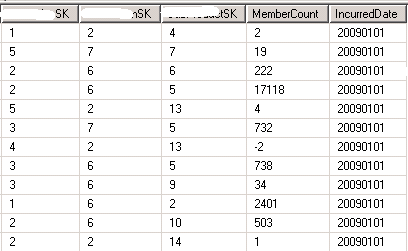
Here is an example of part of the membership fact table. Notice that the incurred date repeats. This is because it depends on which dimensions you slice on which member count you will get. This also needs to be summed up to the month level. After the month level it is no longer valid as a sum. This seems tricky but can be done with a calculation. The original member count measure is set to sum on the measure properties. This measure is set to hidden also because the sum is invalid over the month level.
clip_image001

To fix the summing issue you will need to create a calculation to divide up the member count by the number of month. Here is that calculation:

[Member Count]:

Case

When [Date Received].[Date Hierarchy].currentmember.level is

[Date Received].[Date Hierarchy].[Year]

Then [Measures].[Members] / 12

When [Date Received].[Date Hierarchy].currentmember.level is

[Date Received].[Date Hierarchy].[Quarter]

Then [Measures].[Members] / 3

When [Admit Date].[Date Hierarchy].currentmember.level is

[Admit Date].[Date Hierarchy].[Year]

Then [Measures].[Members] / 12

When [Admit Date].[Date Hierarchy].currentmember.level is

[Admit Date].[Date Hierarchy].[Quarter]

Then [Measures].[Members] / 3

When [Discharge Date].[Date Hierarchy].currentmember.level is

[Discharge Date].[Date Hierarchy].[Year]

Then [Measures].[Members] / 12

When [Discharge Date].[Date Hierarchy].currentmember.level is

[Discharge Date].[Date Hierarchy].[Quarter]

Then [Measures].[Members] / 3

Else

[Measures].[Members]

End

In this calculation you can see the case statement is just dividing the member count by 12 at the year level and 3 at the quarter level. The member count is not valid below the month level so this takes care of all the possibilities. You will also notice that the calculation includes all three of the date hierarchies. This ensures the calculation works in all date dimensions. This can be shown on the reports and will show the correct member count for every level in all the date dimensions. The below image is of the member numbers with just the summation and the other after the above calculation. By dividing with the number of months we get the average instead of the sum at the quarter and year level, which is what we want.
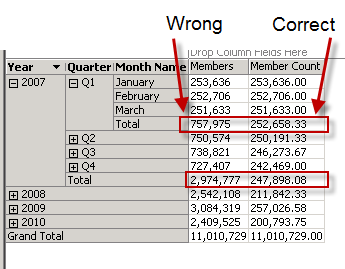
clip_image002

The next calculation is just to divide the member count by 1000. This can also be shown on the reports at all date levels.

[Member Count / 1000]:

iif([Measures].[Member Count] <= 0,

null,

[Measures].[Member Count] / 1000)

The last calculation we need to do to the member count is used in the actual calculations where you divide the measures by the member count. In this example you will use the Authorization count. But instead of multiplying every measure by a number then dividing by the member count, you can do a little math and figure out that you just divide the member count number and then use this one number for all measures.

[MemberCount / 1000 for Calcs]:

Case

When IsEmpty([Member Count / 1000])

Then Null

When [Date Received].[Date Hierarchy].currentmember.level is

[Date Received].[Date Hierarchy].[Year]

Then [Member Count / 1000]

When [Date Received].[Date Hierarchy].currentmember.level is

[Date Received].[Date Hierarchy].[Quarter]

Then [Member Count / 1000] / 4

When [Admit Date].[Date Hierarchy].currentmember.level is

[Admit Date].[Date Hierarchy].[Year]

Then [Member Count / 1000]

When [Admit Date].[Date Hierarchy].currentmember.level is

[Admit Date].[Date Hierarchy].[Quarter]

Then [Member Count / 1000] / 4

When [Discharge Date].[Date Hierarchy].currentmember.level is

[Discharge Date].[Date Hierarchy].[Year]

Then [Member Count / 1000]

When [Discharge Date].[Date Hierarchy].currentmember.level is

[Discharge Date].[Date Hierarchy].[Quarter]

Then [Member Count / 1000] / 4

Else

[Member Count / 1000] /12

End

This last calculation may be confusing. To help clarify this, take a look at the 1000pmpm calculation again:

[Auth Count] x ((12 / [number of months]) x 1000) / [Member Count]

What you are basically doing is moving the ((12 / [number of months]) to the bottom of the calculation and dividing the member number by this answer. This ensures the company can compare the number across any level. So the quarter level should be very close to the month and year level. The last calculation makes sure this happens by dividing member count by the number of quarters in a year at the quarter level. At the year level it would be 12 divided by 12, which equals 1 so no division is needed. That final else is used to get all the months.

Now you can use this final calculation to divide all the measures in the cube. The below calculation can be applied to all measures. This calculation is checking for divided by zero errors then just dividing the measure by the member number we have worked hard to get above.

iif([Measures].[Member Count / 1000] <=0,

Null,

[Measures].[Auth Count] / [MemberCount / 1000 for Calcs])

Here you can see the final results:

clip_image003

By using this method you can use this final member count number easily and save lots of unnecessary work. If you try to calculate each measure separately all of the calculations would have been massive.


Posted in mdx, SSAS, Syndication | Tagged , | 4 Comments

SQL Saturday Jacksonville FL 2013

This weekend at SQL Saturday JAX I had a great time and got to meet some great people. I had three sessions and the reviews were great. I did an MDX session in the morning. My attendees were trying to learn MDX first thing in the morning on a Saturday, that had to be rough.  But I think they all learned a lot and one of the comments was great, “I learned a lot more than expected for an intro session”.

My second session was on complex DAX expressions. I had more technical problems in this session that any other in my life. The PowerPivot add-in would not stay open in the workbooks. I ended up rebooting my machine to get things working. I felt bad for everyone having to wait for that, luckily I have an SSD and the re boot only took about a minute. Again the reviews were good despite the technical issues.

The last session of the day was Iron Chef. Where I squared off against Brian Knight to compare traditional BI to self service BI. Brian showed some of the cool new tools like Power View and Geo Flow, and I showed the traditional BI using SSIS, SSAS, and SSRS. Of course traditional BI takes a lot longer to develop so I cheated and had a lot of things pre built for the session. 20130427_181933

The after event was at Sneakers and it was a Blast. Karaoke was on and people were playing pool and enjoying some good food.

Posted in Community, SQL Saturday | Tagged | 4 Comments

Adventures in Interviewing

I have done over 140 interviews for potential employees at Pragmatic Works. In that time we have only hired a very small percentage of those people. Now a lot of that has to do with lacking skills. I cover that in another post here.

image  This Post is about the ones that had the skills,  but still did not make the cut due to something they said or did in the interview. Basically a list of what not to do in an interview.

1. Pragmatic Works Consulting is a traveling job. It requires 50% travel. Don’t say you are okay with travel, then say you don’t want to travel where there is snow.

2. Don’t ask if you can take your pet with you on the road because they get depressed. Get a pet sitter please.

3. When asked about handling office conflict, don’t say you will “Punch him in the face!”, even if you are joking.

4. If your spouse does not want you to travel, that is something you should mention up front.

5. Do not say you hate airports, but you will deal with the travel.

6. When asked about learning new technologies, don’t say you already learned them all.

7. When not traveling you work from home at Pragmatic Works. When asked about your home office set up, don’t mention the Xbox 360 in your office.

8. Don’t rank yourself a ten on a technology then say you are “Rusty” on it.

9. Don’t say you hate to read.

…and last but not least…

10. Don’t cuss during the interview.

Hope this helps out a few people, and gives a few others a laugh.

Posted in Pragmatic Works, Training | Tagged | Leave a comment

JAX SQL User Group – Speaker Idol 4/17/13

Last nights Speaker Idol at the Jacksonville SQL User Group was awesome. Had 4 great speakers. the winners took home some great prizes. But my favorite part of the night was a slide by Mitch (@SqlLittleFriend) . He paid tribute to Devin Knight (http://devinknightsql.com|@knight_devin ). Enjoy!

20130417_191422

Posted in Uncategorized | Leave a comment

SSRS Map Label Overlap Fixed

In Reporting Services 2008 r2 and above there is a great tool called the Map tool. It is great for visualizing data across a map. One of the issues I have run into is overlapping labels. For example I am trying to track where people in the company are at today. If two people are in the same location there names over lap on the report making them both unreadable.

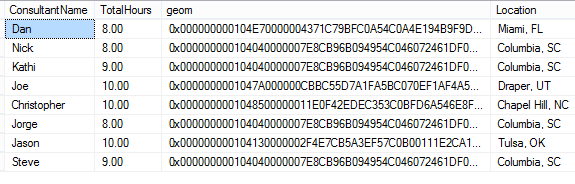
Here is a sample of my data. Here you can see I have four people in Columbia, SC. You will notice I also have the spatial data for the location of the city.

image

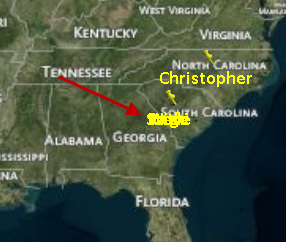
When I show this on a map and try to show the names they over lap as seen below.

image

To fix this I went back to my data set and a created a rank function to rank the number of cities that match. The SQL is below.

,RANK() Over (Partition by SpatialCity.location order by [user].LastName) Ranks

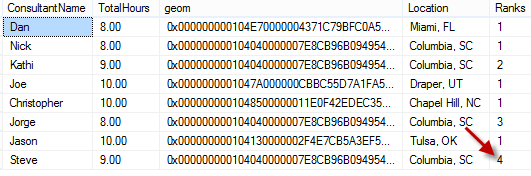
Now my dataset has a rank next to each City and the matching cities have different numbers for each consultant name. The new dataset is seen below.

image

Back in reporting services, now all that is left is to adjust the label on the map. The code below shows the label expression. I am adding line feed/carriage returns for each number in the rank column. I only have 5 levels here you could go as far as you would like.

=iif(Fields!Ranks.Value = 1, Fields!ConsultantName.Value,
iif(Fields!Ranks.Value = 2, vbCRLF + Fields!ConsultantName.Value,
iif(Fields!Ranks.Value = 3, vbCRLF + vbCRLF + Fields!ConsultantName.Value,
iif(Fields!Ranks.Value = 4, vbCRLF + vbCRLF +vbCRLF + Fields!ConsultantName.Value,
iif(Fields!Ranks.Value = 5, vbCRLF + vbCRLF +vbCRLF +vbCRLF + Fields!ConsultantName.Value,
Fields!ConsultantName.Value
)))))

Now the names show on the report not over lapping.

image

Let me know if you have any questions.

Posted in Syndication, Uncategorized | Leave a comment

Studying and Learning Business Intelligence

I have been doing interviews for Pragmatic works for the past few years and I have come across quite a few people who wanted to be hired as a senior BI consultant and their skills were just not up to the level of a senior consultant. It seems they work in an environment that corners them into doing things a certain way and not giving the opportunity to grow pass their defined role. So I put together a list of study items to help people ramp up in BI skills.

Here are some suggested books:

BI:

http://www.amazon.com/Knights-Microsoft-Business-Intelligence-24-Hour/dp/0470889632/ref=sr_1_1?s=books&ie=UTF8&qid=1349185599&sr=1-1&keywords=business+intelligence+24+hours

SSIS:

http://www.amazon.com/Knights-Microsoft-Integration-Services-24-Hour/dp/1118479580/ref=sr_1_8?ie=UTF8&qid=1349185567&sr=8-8&keywords=ssis+2012

http://www.amazon.com/Professional-Microsoft-Server-Integration-Services/dp/111810112X/ref=sr_1_1?ie=UTF8&qid=1349122074&sr=8-1&keywords=ssis+2012

SSRS:

http://www.amazon.com/Professional-Microsoft-Server-Reporting-Services/dp/1118101111/ref=sr_1_1?ie=UTF8&qid=1349122094&sr=8-1&keywords=ssrs+professional

SSAS:

http://www.amazon.com/Expert-Development-Microsoft-Analysis-Services/dp/1847197221/ref=sr_1_3?s=books&ie=UTF8&qid=1349122111&sr=1-3&keywords=ssas+professional

For Data modeling:

http://www.amazon.com/The-Data-Warehouse-Toolkit-Dimensional/dp/0471200247/ref=sr_1_1?ie=UTF8&qid=1349122258&sr=8-1&keywords=data+warehouse+toolkit

You may also want to consider getting certified in business intelligence

http://www.bidn.com/blogs/MikeDavis/ssis/369/microsoft-business-intelligence-certification-70-448-ssis-ssas-ssrs

http://www.bidn.com/blogs/MikeDavis/ssis/881/microsoft-business-intelligence-certification-pro-test-70-452

I would also suggest you get involved with the SQL community by attending and speaking at your local user groups and SQL Saturdays, and start blogging to get your name out there.

http://www.sqlpass.org/

I would also suggest following these blogs and reading them weekly to keep up with the newest information.

SSIS:

http://sqlblog.com/blogs/jamie_thomson/

http://blogs.msdn.com/b/mattm/

SSAS:

http://cwebbbi.wordpress.com/

http://sqlblog.com/blogs/alberto_ferrari/

SSRS:

http://blogs.msdn.com/b/robertbruckner/

http://blogs.msdn.com/b/sqlrsteamblog/

http://blogs.msdn.com/b/bobmeyers/

Attend the free webinars available at :

http://pragmaticworks.com/LearningCenter.aspx

If you are a senior BI developer and you have other suggestions please leave a comment to help out those still growing.

Good luck in your studies.

Brad Ball Published a blog on how to ramp up in the DBA world her http://www.sqlballs.com/2012/10/dba-study-guide.html

Posted in Business Intelligence, PASS, Pragmatic Works, SSAS, SSIS, SSRS, Syndication, Training | Tagged , , | 2 Comments

Crystal Reports DataDate in SSRS

Crystal Reports has a special field name “DataDate”. This date shows the last time the data on the report has been executed. A recent client asked for the similar functionality in SSRS when a snapshot is run. They wanted to see the actual date for to be used as a print date but they wanted to have the date the data was pulled for the report. This can be accomplished with the build in field in SSRS named ExecutionTime. This will return the date the report ran last even when the snap shot is pulled up much later. So you can have the Now() function show the current date, so you know when the report was printed. And you can have the date the data was updated similar to the DataDate in Crystal Reports.

Posted in SSRS, Syndication | Tagged | Leave a comment

IT Pro Camp Jacksonville 2012

I spoke last weekend (6/16/2012) at the first ever IT Pro Camp in Jacksonville Florida. It was a great event with over 100 people attending. Breakfast and Lunch was provided with a great after event at Tilted Kilt.

One of the great sessions I attended, besides my own Smile, was Jose Chinchilla. He did a great job showing the new T-SQL features in SQL Server 2012. My session was on the new features in SSIS in SQL Server 2012.
Over all it was a great event and Blain Barton (Blog) from Microsoft did a great job. I look forward to next years event.

Posted in SSIS, T-SQL, Training | Tagged | Leave a comment

Using PowerPivot to Monitor Reporting Services

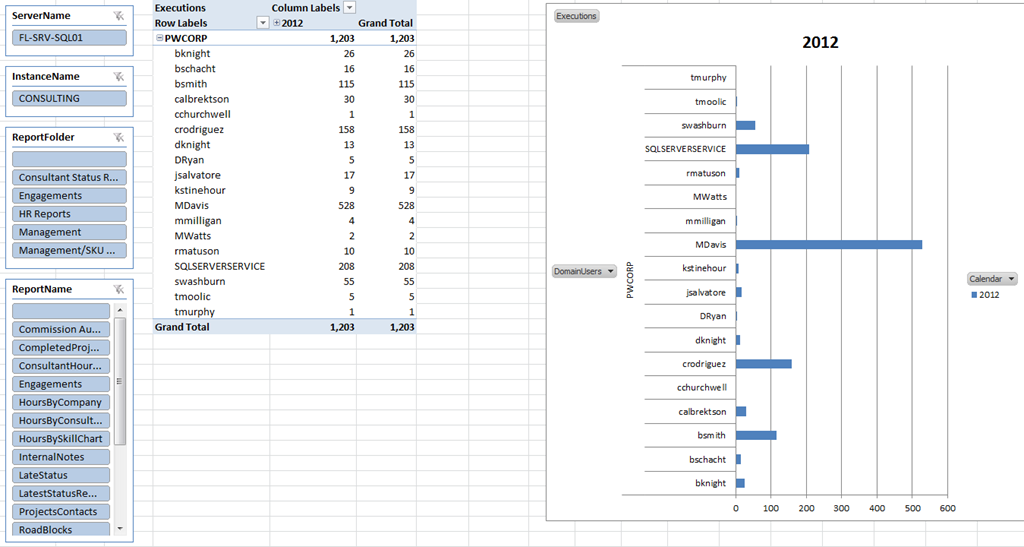
PowerPivot is a powerful new tool from Microsoft that has been improved even more in the 2012 release, which you can download for free here. In this blog I will give you a PowerPivot workbook that I created to connect to the Reporting Services logs and pull data. This gives you the ability to see the performance of your report server very easily.

Report Example:

image

Keep in mind that all the data in PowerPivot is pulled into memory so if you have a large reporting environment you may have to limit the data with a where clause on the query in the work book. The instructions are in the workbook.

Download the workbook here and let me know what you think.

This was created with PowerPivot 2012 and connected to SSRS2008 R2 log.

Posted in powerpivot, Syndication | Tagged , , | 2 Comments

Oracle Date issues with PowerPivot

This week I was building power pivot models for a client pulling data from Oracle. One table kept giving the below error when trying to import:

OLE DB or ODBC error: Accessor is not a parameter accessor..

Out of line object Datasource referring to id ….

Out of line object datasourceview … temp_dsv

Here is the image:

clip_image002

None of this error made any sense. It was just a table in Oracle we were trying to pull from. After some troubleshooting I was able to find that a date column was causing the issue. Upon further digging we found that it was dates that had the year set to ‘0001’.

clip_image002[5]

So you will need to use a query to convert these bad dates to a valid year, like 1900 or something similar when pulling data from Oracle with PowerPivot.

Posted in powerpivot, Syndication | Tagged , | Leave a comment